
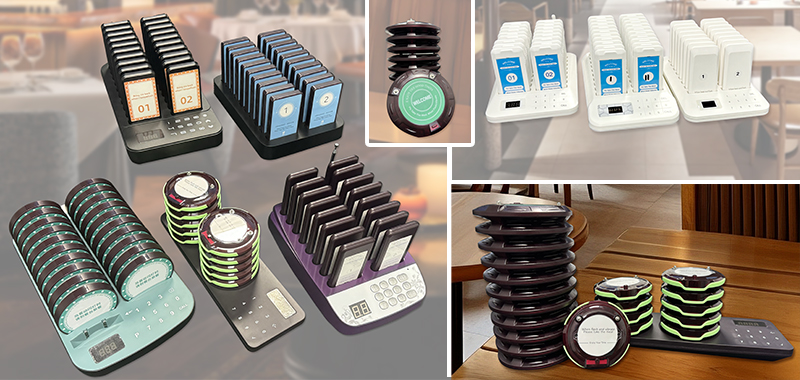
Why the right wireless paging system matters
For restaurants, cafes, food halls, clinics, and service counters, speed is only part of the customer experience. What really shapes the handoff moment is whether guests know when to come back, where to wait, and how smoothly staff can keep the line moving. A reliable wireless paging system helps solve that problem without creating noise, confusion, or crowding around the counter.
If you are comparing pager systems for the first time, the goal is not just to buy more pagers. The real goal is to choose a setup that matches your daily flow, your busiest service periods, and the number of guests you need to manage at one time.
1. Start with your real guest volume
The fastest way to narrow down your options is to look at how many orders or waiting guests you usually handle during a rush. A smaller location may only need a compact set for a lunch wave, while a larger pickup counter or multi-station service area may need a higher pager count to avoid delays and repeated turnover pressure.
- Small counters often begin with a lighter kit for day-to-day pickup.
- Mid-volume operations usually need more flexibility during peak hours.
- Large or multi-location teams should plan for growth before ordering.
Choosing by real queue volume makes your system easier to use from day one and reduces the chance of replacing it too quickly. Many buyers start by comparing 10 pager systems, 16 pager systems, 20 pager systems, and 24 pager systems before narrowing down the best match.
2. Check how the charging base fits your counter
Wireless paging systems are used in tight, active workspaces. The charging dock should feel practical on the counter, not like something your staff has to work around. Look at the footprint, cable placement, and how easily pagers can be taken out and returned during a rush.
A good base design should help your team stay organized, especially when multiple staff members are handling orders, guest pickup, or front-desk service at the same time.
3. Think about where the signal needs to reach
Not every business uses pagers in the same way. Some only need to call guests back from a nearby pickup shelf, while others need stronger coverage across a dining room, waiting area, patio, school office, or clinic entrance. The best system is the one that fits your actual space, not just the one with the biggest number on the box.
When comparing systems, ask yourself:
- Will guests stay close to the counter, or spread across a larger area?
- Are there walls, partitions, or multiple rooms between staff and waiting guests?
- Do you need a simple pickup call flow, or something that supports a more complex service environment?
4. Balance retail speed with wholesale flexibility
One of the biggest advantages of a modern online store is that smaller orders can move fast. If you already know which system fits your location, retail checkout lets you review pricing and place an order right away. That works well for single-store needs, quick replacements, or straightforward restocks.
But if you need 10 or more units, delivery planning, or help choosing between several system sizes, it often makes sense to ask for project pricing first. That way you can compare the best setup, review timing, and confirm whether a larger order needs a different path.
5. Choose a system your staff can use without overthinking it
The right pager system should reduce friction, not introduce new steps. Your team should be able to assign a pager quickly, explain it to the guest in a few seconds, and collect it again without slowing the line down. Simplicity matters more than extra complexity when the counter is busy.
That is why many buyers focus on practical details like clear charging layout, easy pickup-and-return handling, and a setup that feels intuitive during the busiest part of service.
Final takeaway
If you are buying a wireless paging system, start with your real service flow: guest volume, waiting area size, counter layout, and whether you need a fast retail purchase or a larger quantity conversation. Once those points are clear, the right choice becomes much easier.
STMITE systems are built for busy counters and practical day-to-day service. If you are still comparing options, start with the product size that matches your queue, then review charging style, layout, and ordering path based on how your business actually works.
Browse STMITE paging systems or chat on WhatsApp if you want help choosing the right setup.
Recommended STMITE Product Links
- STMITE Restaurant Pager System 10 Pack
Best for lighter queue volume and smaller counters. - STMITE Restaurant Pager System 16 Pack
A balanced fit for steady lunch and pickup traffic. - STMITE Restaurant Pickup Pager System 20 Pack
Useful for faster turnover and busier service periods. - STMITE Guest Pager System 24 Pack
A larger set for broader waiting areas and heavier demand.
Frequently Asked Questions
What pager quantity should I start with?
Start with your real peak waiting count, not your average quiet-hour traffic. That is usually the best way to avoid underbuying or overspending.
Can I order online and still ask about bulk pricing?
Yes. STMITE supports retail checkout online, and you can still contact us first if you want business pricing or quantity guidance.