
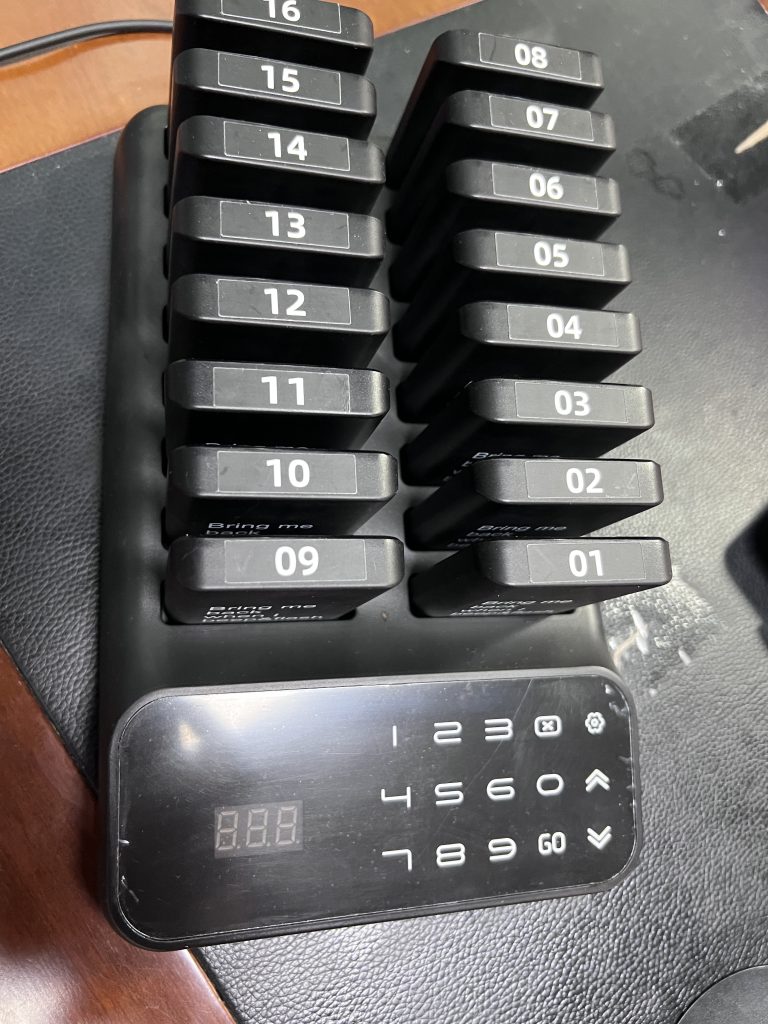
The charging base is more than a storage point. It is the reset point for the whole restaurant pager workflow. If the base is hard to reach or hidden from staff, pagers come back slowly and the counter can run out during a rush.
Where to place the charging base
Place the charging base near the staff handoff workflow, not in a back room. The best location is close enough for staff to return pagers immediately after pickup while still protected from spills, heat, and heavy traffic.
Build a return habit
- Customer returns to the pickup counter after the alert.
- Staff collect the pager before handing off the order.
- Staff place the pager back on the base immediately.
- The pager number becomes available for the next customer.
Keep numbering visible
If the base makes pager numbers easy to see, staff can assign the next pager faster. A visible base also makes it easier to notice missing pagers before the counter runs short.
Connect base setup to kit size
Charging-base discipline can make a smaller kit work better. Slow returns can make even a larger kit feel short. If your team often holds several unfinished orders at once, compare the 16 pager system, 20 pager system, and 24 pager system.
Related STMITE pages
- Restaurant pager system
- Restaurant pickup pager system
- Wireless guest pager system product
- Shop STMITE pager systems
FAQ
Should the pager charging base be visible to staff?
Yes. A visible base helps staff return pagers quickly, notice missing pagers, and keep the next assignment simple.
Can poor base placement make the system feel too small?
Yes. If pagers are not returned quickly, the available count drops during rush even when the kit size is reasonable.
Where should restaurants avoid placing the base?
Avoid wet, hot, crowded, or hidden locations where staff cannot safely and consistently reset pagers.
Share this article
Next useful pages
Continue To The Main Buying Pages
These related STMITE pages connect this guide to the live product path, commercial pages, and comparison resources.Core buying paths
- Restaurant Pager SystemMain restaurant pickup and waiting-area buying path.
- Guest Paging SystemGeneral guest waiting and return-call planning.
- Wireless Paging SystemBroad planning page for restaurants, clinics, and service desks.
- Wireless Calling SystemReturn-call workflow for pickup and service counters.
- Customer Paging SystemCustomer callback planning for waiting areas and counters.
Pickup notifications
- Takeout Pager SystemFood pickup and takeaway counter notification path.
- Order Ready Pager SystemOrder-ready alerts for food, drink, and service pickup.
- Customer Notification SystemOn-site customer notification without app or phone signup.
- Queue Paging SystemQueue flow page for customers waiting away from the counter.
Product and comparison
- Paging Systems CategoryBrowse the live STMITE paging system product category.