
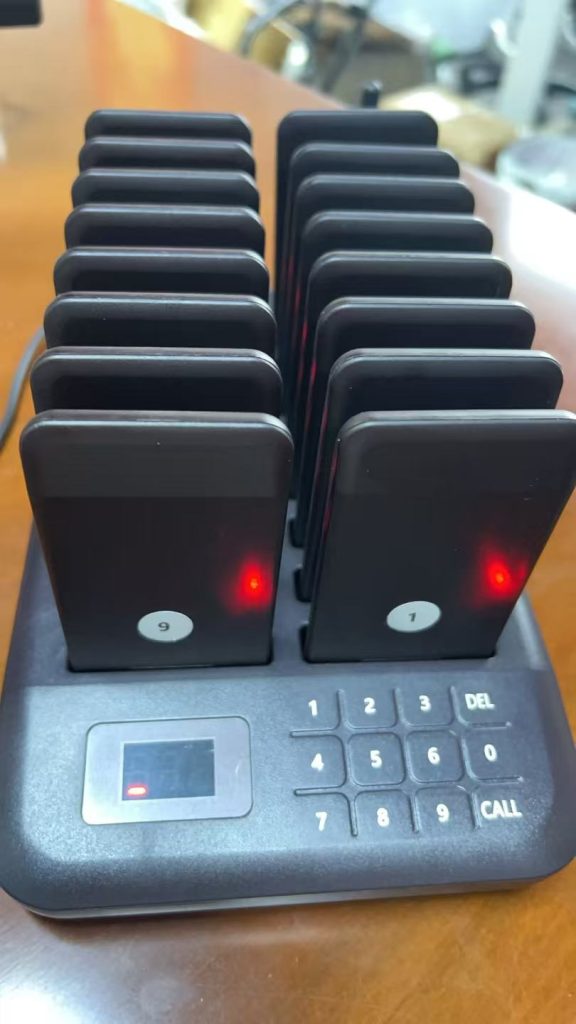
Restaurant pager numbering is the link between the customer and the order. If staff do not record pager numbers consistently, the system becomes harder to trust during rush. A simple numbering workflow keeps pickup calls clean.
The basic numbering routine
- Assign one pager to one active order or waiting customer.
- Write the pager number on the ticket, receipt, POS note, or order board.
- Call the same number only when the order is ready.
- Collect the pager at pickup and mark the order complete.
- Return the pager to the base so it can be assigned again.
Avoid duplicate assignments
During busy service, staff should never guess which pager went with which order. Keep available pagers separated from active pagers, and return each pager to the charging base before assigning it again.
Use the workflow to choose quantity
If several pagers are often active while more orders are being prepared, the business may need a larger buffer. Compare the 10 pager system, 16 pager system, and 20 pager system against your real rush-hour flow.
Related STMITE pages
FAQ
Why does pager numbering matter?
It prevents staff from calling the wrong customer and keeps the order ticket connected to the correct pager during service.
Should one pager ever be assigned to two active orders?
No. Assign one pager to one active customer or order until that pager is collected and reset.
What is the simplest numbering method?
Write the pager number directly on the order ticket or POS note at the moment the pager is handed to the customer.
Share this article
Next useful pages
Continue To The Main Buying Pages
These related STMITE pages connect this guide to the live product path, commercial pages, and comparison resources.Core buying paths
- Restaurant Pager SystemMain restaurant pickup and waiting-area buying path.
- Guest Paging SystemGeneral guest waiting and return-call planning.
- Wireless Paging SystemBroad planning page for restaurants, clinics, and service desks.
- Wireless Calling SystemReturn-call workflow for pickup and service counters.
- Customer Paging SystemCustomer callback planning for waiting areas and counters.
Pickup notifications
- Takeout Pager SystemFood pickup and takeaway counter notification path.
- Order Ready Pager SystemOrder-ready alerts for food, drink, and service pickup.
- Customer Notification SystemOn-site customer notification without app or phone signup.
- Queue Paging SystemQueue flow page for customers waiting away from the counter.
Product and comparison
- Paging Systems CategoryBrowse the live STMITE paging system product category.